Grapple God
A game about grappling your way out of hell. Built by a team of three in 72 hours for SpeedJam #5.
At a glance
- Engine & language
- Unreal Engine 5 / C++
- Project status
- Playable game jam release
- I built and tuned custom grappling forces, forgiving target selection, and momentum-based combat within a 72-hour jam. Read
- My C++ excerpts show the swing's vector maths, spline rope rendering, and speed-driven camera effects. Read
- I limited enemy randomisation and used Unreal's profiler to cut expensive features so repeat runs stayed predictable and smooth. Read
- I handled programming and in-engine implementation in a three-person team, building Grapple God in 72 hours for SpeedJam #5. Read
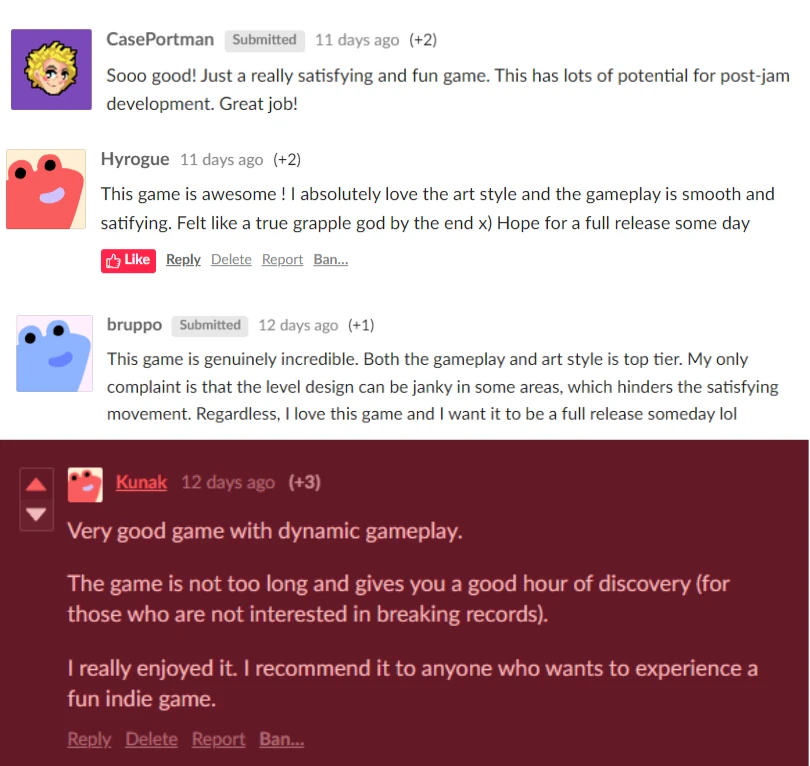
- Players praised the movement and art, while identifying rough spots in the level design. Read
Technical breakdown
Making the grappling hook feel good in 72 hours
The grappling hook was the centre of the game, so getting its movement right was a priority. Players needed to build momentum and judge when to release the rope, with enough control to make precise moves while travelling at speed.
I built the grappling movement in C++ using a custom force calculation based on the player's velocity, position relative to the anchor, and swing angle. That gave me control over how the swing behaved. Through playtesting, I adjusted the forces and movement parameters to find a balance that felt responsive and enjoyable.
Choosing an attachment point was part of that feel too. I gave grapple targeting some leeway: players could aim in the general direction of a valid surface and click to attach, without lining up an exact point. This let them focus on choosing a route and timing each swing while moving at speed.
Combat used the same momentum: players killed demons by crashing into them at high speed. I implemented the collision and damage handling, then added a brief slowdown on a successful kill to give the impact more weight.
Player feedback repeatedly picked out the movement as smooth and satisfying. For a game made over one weekend, seeing people enjoy learning the hook and building up speed was a rewarding result.
Selected C++ excerpts
The code behind the game feel
The core of the grapple is a mathematical swing model implemented in an actor component. I calculate and apply forces through Unreal's character movement system, then use a spline to draw the rope and a separate camera manager to reinforce the sense of speed.
Building the swing with vector maths
I use a dot product between the clamped player velocity and the vector from the anchor to the player to measure movement towards or away from the anchor, weighted by distance. The resulting force opposes that radial movement. I combine it with an angle-based stretch term and a clamped distance factor to tune how the swing responds.
On top of that force calculation, I add a boost around the bottom of the arc and horizontal steering based on the camera direction. Those terms let me tune the movement for an arcade speedrunning game.
View the swing force calculation (C++)
float DivisionFactor = FMath::Clamp(8000.0f / ((OwnerCharacter->GetActorLocation() - AttachPoint).Size()), 1.0f, 4.0f);

FVector ClampedVelocity = OwnerCharacter->GetVelocity().GetClampedToSize(400.0f, 8000.0f);
float DotProduct = FVector::DotProduct(ClampedVelocity, (OwnerCharacter->GetActorLocation() - AttachPoint));
FVector NormalizedDifference = (OwnerCharacter->GetActorLocation() - AttachPoint).GetSafeNormal();

float WebStretch = (SwingAngle / 90.0f) * 10000.0f;

FVector PendulumForce = ((NormalizedDifference * DotProduct * (-2.0f)) / DivisionFactor) + (NormalizedDifference * WebStretch);

// Speed up when reaching bottom of arc
FVector SpeedUpVelocity = FVector::Zero();
if (SwingAngle > -10.0f && SwingAngle < 30.0f)
{
    SpeedUpVelocity = OwnerCharacter->GetCharacterMovement()->Velocity.GetSafeNormal() * 100.0f;
}

// Add constant force to player based on camera direction
FVector CameraForce = OwnerCharacter->GetFirstPersonCameraComponent()->GetForwardVector().GetSafeNormal() * 160000.0f;
CameraForce.Z = 0.0f;

OwnerCharacter->GetCharacterMovement()->AddForce(PendulumForce + SpeedUpVelocity + CameraForce);
To calculate the swing angle, I use the direction to the anchor and a cross product with the player's velocity direction to construct a rotation frame. Its roll feeds back into the stretch term and the boost window above.
View the swing angle calculation (C++)
void UGrappleHookComponent::CalculateSwingAngle()
{
    FVector NormalizedDifference = (AttachPoint - OwnerCharacter->GetActorLocation()).GetSafeNormal();
    FVector NormalizedVelocity = OwnerCharacter->GetVelocity().GetSafeNormal();

    FVector CrossProd = FVector::CrossProduct(NormalizedVelocity, NormalizedDifference) * -1.0f;

    SwingAngle = FRotationMatrix::MakeFromZX(NormalizedDifference, CrossProd).Rotator().Roll;
}
Keeping the rope connected to the gun
The spline provides the visual rope for the movement calculated above. Each update moves its first point to the gun's muzzle socket, then updates the mesh endpoints and tangents to follow the spline. A dynamic material parameter also fades the launch wobble as its timer counts down.
View rope updates (C++)
// Attach the rope to the gun tip
FVector GunTip = OwnerCharacter->GetGunMeshComponent()->GetSocketLocation(MuzzleSocketName);
SplineComponent->SetLocationAtSplinePoint(0, GunTip, ESplineCoordinateSpace::World);

SplineComponent->UpdateSpline();

TArray<USplineMeshComponent*> SplineMeshes;
SplineActor->GetComponents(SplineMeshes);

DynamicSplineMaterial->SetScalarParameterValue("WiggleAlpha", FMath::Lerp(0.0f, 1.0f, WobbleTime));

for (int32 i = 0; i < SplineMeshes.Num(); ++i)
{
    FVector StartPos, StartTangent, EndPos, EndTangent;
    SplineComponent->GetLocalLocationAndTangentAtSplinePoint(i, StartPos, StartTangent);
    SplineComponent->GetLocalLocationAndTangentAtSplinePoint(i + 1, EndPos, EndTangent);

    SplineMeshes[i]->SetStartAndEnd(StartPos, StartTangent, EndPos, EndTangent);
}
Making speed visible through the camera
Above a speed threshold, the camera's target field of view increases with player speed, clamped between a base and maximum FOV. Interpolation smooths the change, and a separate branch returns the camera to its base FOV when the player slows down.
View speed-based FOV (C++)
if (Speed > SpeedThreshold)
{
    // Calculate FOV based on speed
    float TargetFOV = FMath::Clamp(FMath::Lerp(BaseFOV, MaxFOV, Speed / MaxSpeed), BaseFOV, MaxFOV);

    // Blur
    BlurIntensity = FMath::FInterpTo(BlurIntensity, FMath::Lerp(0.0f, 0.75f, Speed / MaxSpeed), DeltaTime, 30.0f);

    // Smoothly interpolate from current FOV to target FOV
    float NewFOV = FMath::FInterpTo(GetFOVAngle(), TargetFOV, DeltaTime, 15.0f);

    SetFOV(NewFOV);
}
Technical breakdown
Keeping a speedrun consistent
Enemy behaviour needed careful restraint in a game built around repeat runs. Players should be able to learn a route and improve their timing, so I kept the demons' AI simple and limited randomisation.
The small exception was the angle of their fireballs, which varied slightly. That introduced some uncertainty without making the entire encounter unpredictable, so players still had to react while following a familiar route.
Performance also mattered to that consistency. I used Unreal's profiler to find the most expensive parts of the game and disabled costly default engine features where needed. This helped us keep the game running smoothly across different devices within the jam deadline.
Game jam
A game in one weekend
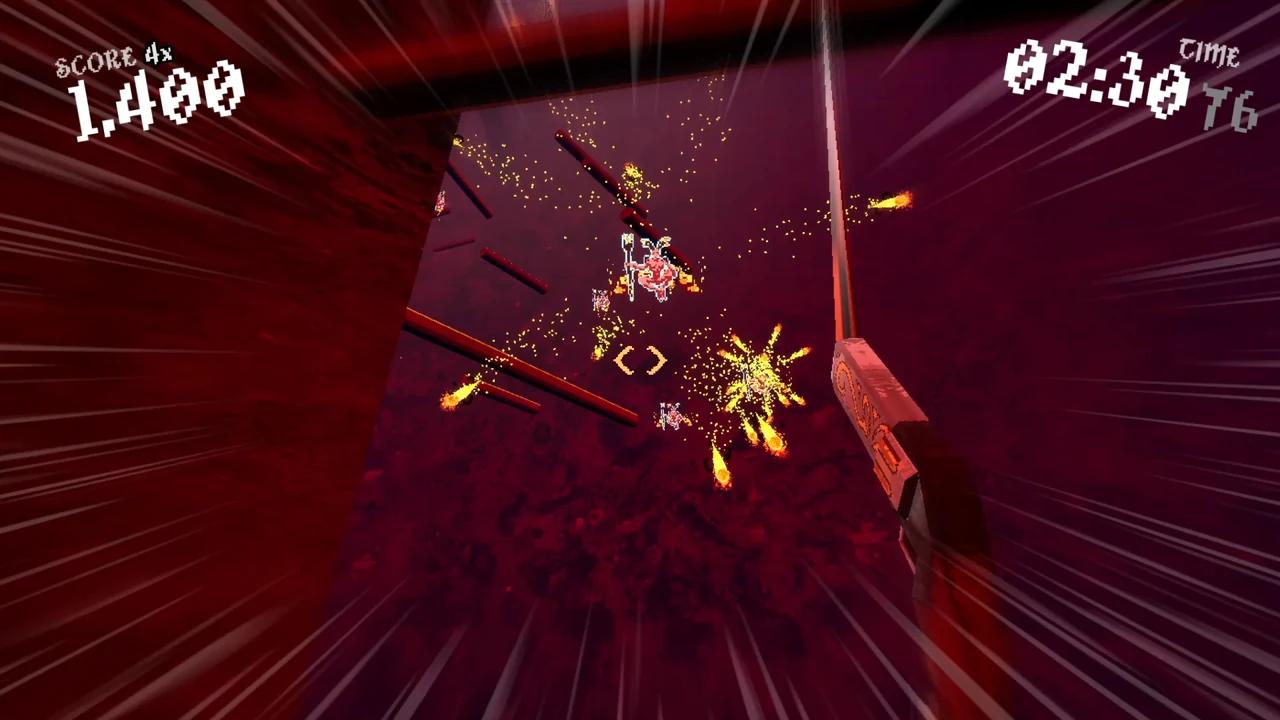
SpeedJam #5 challenged us to make a game built for speedrunning. Over 72 hours, I worked with Hugo Belperron on art and Clyphdrops on music and sound effects to create Grapple God in Unreal Engine 5. Players use a grappling hook to climb a tower out of hell, building enough speed to crash through demons along the way.
I handled the programming and in-engine implementation, including the grappling system, enemy behaviour, and collision and damage handling. With so little time, we prioritised the interactions that made the game enjoyable and used playtesting to guide our changes.
Project review
What players thought
Players responded warmly to the movement and Hugo's art, with several saying they'd like to see a full release. Some also pointed out rough spots in the level design, which was useful feedback on what we'd need to improve beyond the jam.